1-16 second duration control
Create a one-second motion test when you only need to check direction, or generate a full sixteen-second clip when the shot needs a complete reveal, transition, or social story beat.
Turn a prompt, a single image, or a start-and-end frame setup into cinematic motion with native audio, 1-16 second duration control, and output from 360p to 1080p.
Vidu Q3 workflow
Vidu Q3 is built for creators who want to turn an idea into motion without jumping between draft tools and final-render tools. On Vevaro, it opens inside the same studio workflow for prompt-based video, image animation, duration control, resolution selection, audio, and session history.
Use text-to-video when you want Vidu Q3 to imagine the shot from scratch. Use image-to-video when the first frame already matters: a product still, campaign visual, character frame, Nano Banana Pro image, GPT Image 2 image, or any other source frame you want to move.
When the clip needs a more structured path, add an end frame. Vidu Q3 can build transition-style motion from the starting image toward the ending image, which is useful for product reveals, before-and-after scenes, visual transformations, and short social stories.
A matte black camera turns into a surreal product reveal as glowing blue fish move out of the lens, showing how Vidu Q3 can make a static product idea feel alive.
Comece com o modelo selecionado e ajuste resolução, duração e direção do prompt no mesmo fluxo.
Generate with Vidu Q3The numbers that matter
Create a one-second motion test when you only need to check direction, or generate a full sixteen-second clip when the shot needs a complete reveal, transition, or social story beat.
Start from a written scene, animate one source image, or provide both a start frame and an end frame when the motion needs a clear target.
Use 360p or 540p for quick concept tests, then move to 720p or 1080p when the shot direction is ready for a cleaner final pass.
Keep audio enabled for clips that need ambience, atmosphere, motion sound, or a more complete social-ready result instead of a silent draft.
Generated Vidu Q3 examples
A polished sneaker transforms into a botanical sculpture while keeping the same core position and silhouette, a clear example of transition-style motion direction.
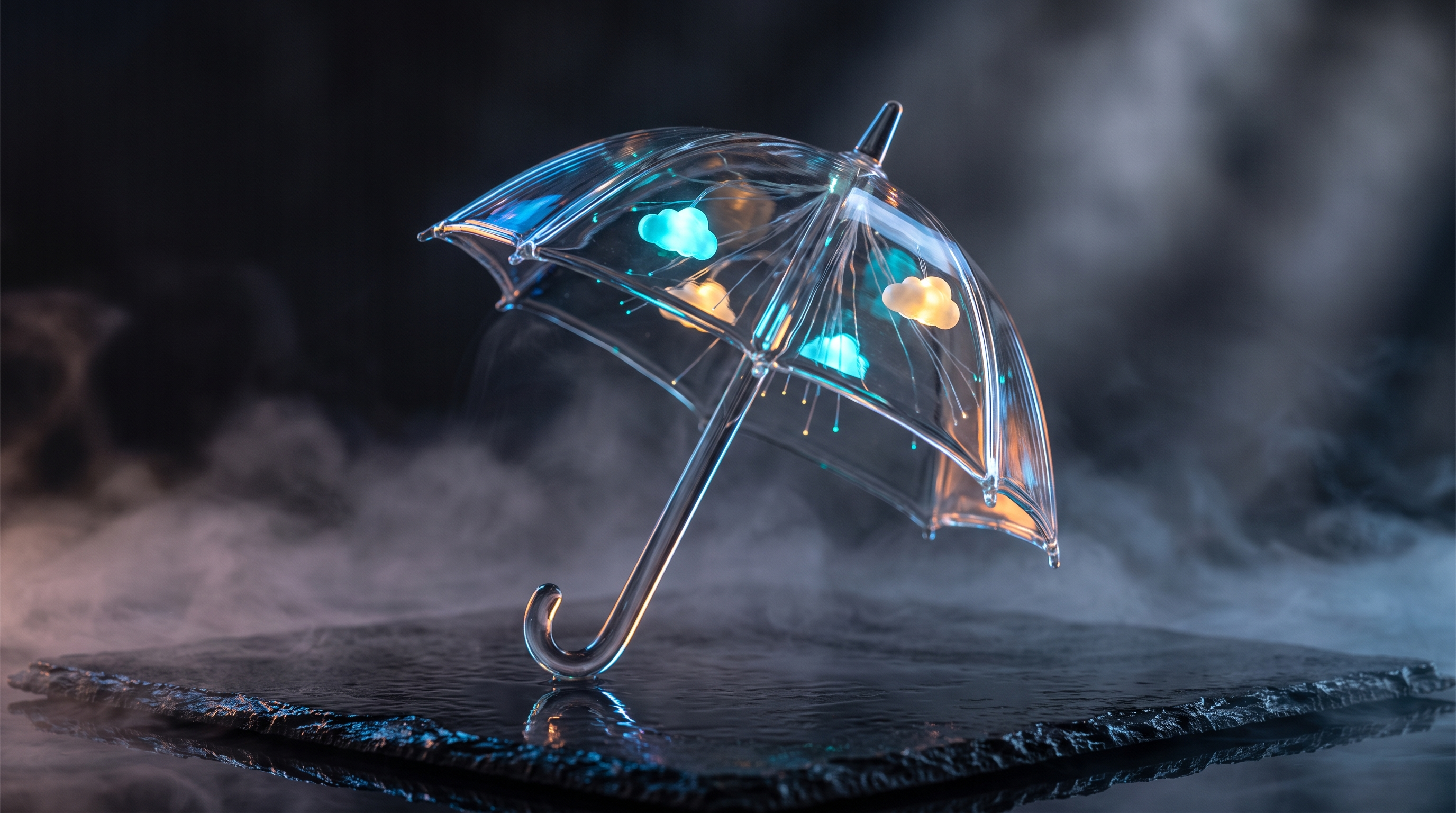
Start with a strong still frame: a glass umbrella, trapped clouds, wet stone, cyan light, and enough negative space for controlled motion.
The same glass umbrella stays centered while clouds swirl inside it, rain rises upward, and the camera pushes in slowly.
A tall campaign-style clip with a perfume bottle, glowing doors, colored mist, and sound-wave-like motion for mobile-first ads and social posts.
Short clips are useful for testing if an idea has energy before spending credits on a longer reveal.
Como funciona
Write a prompt for a new scene, upload a source image when composition should stay anchored, or add an end frame for guided transition motion.
Pick any duration from 1 to 16 seconds. Use lower resolution for fast testing and 720p or 1080p when the result is ready to use.
Review the clip in the studio, adjust the prompt, duration, resolution, audio, or reference frame, then continue from the same session.
Best Vidu Q3 use cases
Animate static product shots into cinematic reveals, rotations, atmospheric ads, and campaign clips before committing to a full shoot or 3D pipeline.
Generate short-form videos for TikTok, Instagram Reels, YouTube Shorts, paid ad tests, launch teasers, and fast creative direction experiments.
Take an image that already works and describe the exact motion: slow push-in, fabric drift, light shift, water movement, camera orbit, or atmospheric depth.
Convert written ideas into moving concept clips before production. It is faster than traditional storyboard illustration and closer to the final feeling of the shot.
Generate motion with built-in atmosphere for presentations, social previews, internal creative reviews, and campaign drafts that should not feel silent.
Vidu Q3 prompt examples
“A sleek matte black camera slowly rotating on wet obsidian stone, soft rim lighting, cinematic depth of field, subtle mist, premium commercial style, no text, no people.”
“A wide aerial shot of fog moving through a mountain valley at sunrise, slow camera drift, soft natural lighting, calm cinematic mood, natural audio ambience.”
“Keep the subject stable. Add slow camera push-in, subtle fabric movement, soft lighting shift, realistic atmospheric depth, and gentle ambient sound.”
“Start with an isolated product on a dark reflective surface. End with the same product surrounded by a soft warm botanical environment. Smooth cinematic transition between both states.”
“A model in a silver raincoat walks through soft fog under pale blue and amber studio lights, slow dolly forward, glossy floor reflections, cinematic fashion film look, natural audio ambience.”
Vidu Q3 FAQ
Vidu Q3 is best for short cinematic video generation, product motion, image animation, social content, transition clips with start and end frames, and fast concept testing with both text and image inputs.
Yes. Vevaro supports Vidu Q3 for both text-to-video and image-to-video. You can animate a single image or use start and end frames for a more controlled transition-style clip.
Vidu Q3 supports 1-16 second video generations on Vevaro. Short durations are useful for motion tests, while longer clips work better for product reveals, story beats, and social videos.
Vevaro exposes 360p, 540p, 720p, and 1080p for Vidu Q3. When an end frame is used, Vevaro avoids 360p because Fal does not support it for that mode.
Yes. Vidu Q3 supports native audio generation. Keep audio enabled when the clip needs ambience, atmosphere, sound effects, or a more complete social-ready result.
Yes. You can generate a Vidu Q3 clip, export it, and use it as a source clip inside a longer editing, compositing, social, or campaign production workflow.
Vidu Q3 is a strong choice when you want 1-16 second duration control, native audio, image animation, and optional end-frame transitions. Veo 3.1 is usually the better comparison point when you need tiered quality modes or higher-resolution output such as 4K.
Modelos relacionados
Crie vídeos cinematográficos com o Google Veo 3.1 na Vevaro. Use os modos Lite, Fast e Quality para fluxos de texto para vídeo e imagem para vídeo com opções em 720p, 1080p e 4K.
OpenAI
Generate cinematic AI videos with Sora 2 on vevaro using text prompts or image-to-video workflows.
Kuaishou
Generate advanced Kling 3.0 videos with standard/pro modes, image-to-video, text-to-video, and motion control workflows.
ByteDance
Use Seedance 2.0 on Vevaro for text-to-video and image-to-video generation with start/end frame control, audio, 4-15 second duration, and 480p, 720p, or 1080p output.
Abra o estúdio com Vidu Q3 selecionado e comece a gerar com as configurações já alinhadas ao fluxo certo.